Tag: Security

  • Designing Secure Systems

    Designing Secure Systems

    Modern systems are an intertwined mesh of human process, physical security, and technology. Attackers are aware of this, commonly leveraging a weakness in one form of security to gain control over an otherwise protected operation. To expose these weaknesses, we need a single unified model that can be used to describe all aspects of the system on equal terms.

    Designing Secure Systems takes a theory-based approach to concepts underlying all forms of systems – from padlocks, to phishing, to enterprise software architecture. We discuss how weakness in one part of a system creates vulnerability in another, all the while applying standards and frameworks used in the cybersecurity world. Our goal: to analyze the security of the entire system – including people, processes, and technology – using a single model.

    We begin by describing the core concepts of access, authorization, authentication, and exploitation. We then break authorization down into five interrelated components and describe how these aspects apply to physical, human process, and cybersecurity. Lastly, we discuss how to operate a secure system based on the NIST Cybersecurity Framework (CSF) concepts of “identify, protect, detect, respond, and recover.”

    Pick up your copy of Designing Secure Systems today: https://www.routledge.com/Designing-Secure-Systems/Melone/p/book/9780367700010

  • The Password is Dead.

    The Password is Dead.

    In the dawn of computing, passwords seemed to provide sufficiently strong identity validation.  I have to think that people felt like some sort of secret agent typing in this string that only they know to identify themselves to a computer.  These were times when cell phones were not nearly as prevalent, multi-factor authentication was expensive and proprietary, biometric technology was expensive and not natively integrated into our operating system, and CPU and memory were very limited resources on a computer.

    Fast forward to today – a time when the idea of a person not having a smartphone brings to mind an aboriginal tribesman.  Users of modern computers typically get concerned when CPU or memory exceed 50% of the system’s available resources and even your phone has multiple processors.  We are undeniably connected to the Internet in various ways at all times, from our laptops to our phones to even our watches.  Multi-factor authentication opportunities are everywhere, yet so few services harvest its capabilities.

    Additionally, we have multiple services that will perform multi-factor authentication on our behalf.  MicrosoftGoogle, and Facebook all provide strong authentication services which are completely handled on our behalf.  All of those stories of a company being hacked and leaking thousands of user name and password combinations online can be a thing of the past if your service doesn’t have its own set of credentials.  For those organizations which are concerned that one of these companies will get hacked I have to ask – do you think you have more invested in information security than them?

    For now, let’s put federation, multi-factor, biometric, and other forms of authentication aside and take a look at the risks associated with simple password authentication systems.

    Passwords are easily obtained

    The simplicity of obtaining a password is nothing new to an information security professional.  During assessments of customer enterprises, we’ve seen passwords stored in files, in the description field of service accounts (which everyone can read), even indexed and cached by search appliances which were given a user account with domain admin membership.

    Another consideration when using password authentication is what I like to call getting “pwned by proxy”.  There are numerous cases where the password to your organization is used elsewhere.  Do your users utilize a different password online than they do for your business?  Chances are, it is highly similar if not the same.  This means that a compromise of any service which shares the same (or a highly similar) password can result in compromise of your service, and there are so many ways to find them.  In this condition, you will likely never know what “patient zero” was.

    How about business partners?  If your organization relies solely on a password to identify users, what happens when one of your business partners gets hacked and has valid credentials to your network in their system?  Again, we are left in a position where your organization may never find “patient zero”.

    Passwords rely on the infallibility of human decision (which doesn’t exist)

    Password authentication is only as secure as your most susceptible user’s decision-making ability.  In other words, if I can trick any user in your organization to send their password over e-mail, type it into a fake web form, or provide it over the phone I can effectively steal that credential.  Not all credential theft involves technology!

    Phishing has plagued corporations for years, and will likely continue to be a problem as long as password authentication is in use.  Even your most skilled information security professionals have clicked a link or logged on at least once, then shortly after questioned whether the page they just logged on to was legitimate (I know I have).  Now imagine the non-technophile audience in your company – would they have thought twice?

    Passwords can be guessed and brute forced

    Most passwords are predictable.  Dictionary attacks work, that’s why they’re still used today.  As humans, we are programmed to use language when coming up with passwords or passphrases.  Where actual words aren’t used, common keyboard patterns such as “qwerty” or “1qaz2wsx” prevail.

    Using password complexity?  Still guessable.  Many organizations with password complexity cause users to perform simple character substitutions, capitalize the first letter, and usually utilize highly predicable patterns.  In fact, if we reference a 2015 report by Trustwave we can see some of these highly complex passwords in our list of the top 10 most common enterprise passwords.

    Passwords Have a Long Validity Period

    Let’s compare a password to asymmetric authentication, such as certificates.  One of the rules when deciding on the size of the key used for a certificate is estimating how long it would take an attacker to deduce the corresponding key pair and ensuring that the key’s validity does not extend beyond that period.

    If we apply the aforementioned principle to a password (or any other form of symmetric authentication) we can state that a credential should not be guessable within its validity period.  Combine that with password lockout policies and we can state that a password used for an account should not be able to be guessed in the number of attempts that could be made (without account lockout) during its validity period.

    Many organizations implement a 90 day password change policy, thus we’ll use that as our password validity period.  Although not a default configuration, some organizations implement policy that enforce account lockout for 30 minutes after 5 failed authentication attempts and a 30 minute period before the lockout counter is reset.  Let’s do the math!

    Password-Attempts

    In this condition, the strength of every password on the network should be able to survive a minimum of 17,280 password attempts.  Now, let’s take into consideration a password spray attack.

    Password spray attacks are when an attacker uses a small number of passwords against a large number of accounts to avoid detection and lockout.  Using this technique allows an attacker to stealthily scan an enterprise for its weakest accounts.  For this next exercise, we will assume the aforementioned enterprise contains 50,000 user accounts.

    Password-Attempts2

    Surely, at least one password is going to fail within 864 million attempts.

    …but I use a password manager with random passwords

    Well, you’re better than most I suppose.  This may provide some decent strength in your authentication method, but will still do effectively nothing against malware running in your user session, fake logon pages, and keylogging.  Additionally, remember that the security of all of your credentials are now entrusted to that third party and their software.

    While we are discussing applications used in the context of a user’s session, let’s go back to keylogging and nefarious means of gathering credentials.  In many cases, keystrokes can be logged without attaining administrative authorization to the operating system – they’re usually just limited to the infected user’s session.  Think about it – can your application read input from the keyboard?  Then why not a keylogger.

    So how do we solve this?

    It is time for passwords to be replaced by a more modern form of authentication, such as biometric or multi-factor.  Passwords can be used locally, but they should not be used to authenticate to remote resources.

    For example, people who use Windows Hello authentication can use a PIN to safely sign into their laptop, then enable the laptop to subsequently authenticate them to networked resources with passport authentication.  This means that an attacker would not only need your password, but also access to your laptop in order to trigger a successful authentication.

    Other examples include using one of the previously mentioned federated authentication providers that allow for multi-factor authentication.  These systems typically use a phone app or text message to validate a user’s identity.  Although not infallible, this method is significantly stronger than a simple password.

    Enterprise customers can use services such as Azure Multi-Factor Authentication to simplify two factor authentication deployment.  This service enables two-factor authentication for Remote Desktop Protocol (RDP), Microsoft Internet Information Services (IIS), and VPN.

  • Petya and WannaCrypt Ransomware Propagation

    Petya and WannaCrypt Ransomware Propagation

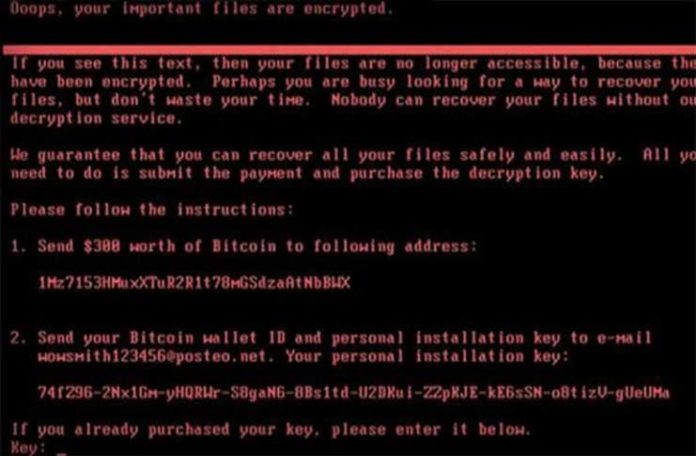
    Ransomware is not new, as was covered in a previous post.  Over the past two months, the Internet has been overrun by two malware variants which are responsible for destroying an immense amount of data and crippling corporations.  In this post, we will use the concepts of access and authorization discussed in Think Like a Hacker to analyze its operation and better understand its propagation.

    The Internet was introduced to a new type of ransomware on May 12, 2017 – one that leveraged an effective self-replicating (a.k.a. worm) capability to infect a large number of systems in a short amount of time.

    Propagation of WannaCrypt was successful primarily due to its use of a powerful remote code execution vulnerability dubbed EternalBlue.  Although novel, the implementation of EternalBlue in WannaCrypt was more of a copy-and-paste approach to an already disclosed and patched vulnerability.

    EternalBlue

    On April 14, 2017, a series of exploits were published to the Internet by a group under the name ShadowBrokers.  This group had previously published other batches of exploits; however, previous disclosures were not nearly as powerful as EternalBlue.

    EternalBlue is a tool which exploits a vulnerability in the Microsoft Windows implementation of the SMB 1.0 protocol. SMB is used heavily by Windows systems in an enterprise setting to transfer data between systems.  Additionally, many non-enterprise users utilize this protocol to transfer files between systems, such as file sharing.  For more detailed technical information about the vulnerability exploited by EternalBlue, check out CVE-2017-0144.

    EternalBlue is a remote code execution exploit, which means successful execution of the exploit would enable an attacker to run arbitrary code on its host.  In the case of WannaCrypt, the arbitrary code was itself – thus enabling the worming behavior.

    Access

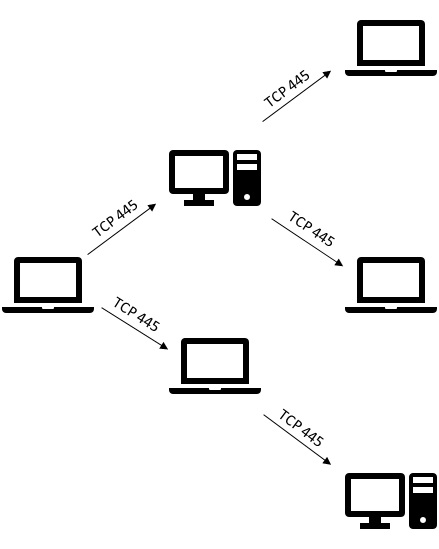
    The widespread use of SMB throughout both public and private networks provided the malware to access a very large number of potentially vulnerable systems.  Once a machine became infected, any machine accessible to that infected host over SMB may become the next potential victim.  This created a target rich environment when paired with the worm capability implemented in WannaCrypt.

    Authorization

    The vulnerability exploited by EternalBlue could be accomplished without credentials, thus making the authorization required to execute this vulnerability effectively anonymous.  Once exploited, EternalBlue enabled the attacker to execute code using the effective authorization of the SMB server service, whose identity is the “SYSTEM” account.  As such, any code executed in this context will likely be unrestricted.

    Effective Access and Authorization by Proxy

    WannaCrypt utilized this pattern to rapidly infect systems throughout the Internet, starting with a single vulnerable system, then infecting any unpatched hosts which it could access over TCP 445 (vulnerable machines are those that had not installed MS17-010).

    When paired with the lack of authentication needed to execute the exploit, this provided a platform for a highly effective worm.
    EternalBlue-WormPetya \ NotPetya

    Just as the world was updating their systems to avoid WannaCrypt, another worm entered the picture – Petya.  Like WannaCrypt, Petya leveraged EternalBlue to enable itself to propagate rapidly.  Being on the heels of another worm utilizing EternalBlue means that fewer vulnerable systems will remain available for attack.  Unfortunately, Petya didn’t stop at using EternalBlue.

    Credential Theft

    Petya was the “enterprise” version of WannaCrypt designed to take advantage of organizations with lax credential hygiene.  According to the write-up by the Microsoft Malware Protection Center, Petya contained a tool with a large degree of similarity to Mimikatz, a tool commonly used for credential theft.

    Use of pass the hash and credential theft as a form of self-propagation is rather new.  Traditionally, tools of this type are run manually by penetration testing teams in search of enterprise configurations where a single credential provides local administrative authority to multiple systems.  Petya marks the first documented time this technique was utilized to provide worm behavior at scale.

    Petya’s use of credential theft tools shows a particular interest in attacking enterprise networks, as these tools are much more effective in environments where single sign-on or shared local administrator credentials are used.  Additionally, Petya’s focus on accounts logged on using Remote Desktop Protocol (RDP) further demonstrates its interest in enterprises.

    Successful use of credential theft enables the malware to masquerade as the stolen identity, thus providing authorization equivalent to logging on with that credential.  In enterprises where every user has membership in the local “Administrators” group, a single stolen domain credential can provide local administrator authority to every workstation.  If the stolen account has additional permissions beyond that of a workstation administrator (for example, a domain admin or member server admin), that instance of malware will gain the authority of that credential.

    An infected machine will attempt to use these credentials to copy the Petya malware to the new victim machine and will attempt to start it using either PSExec or WMIC, both common administrative tools (the latter being a built-in Windows utility).

    Access

    Replication using EternalBlue is highly similar to WannaCrypt, therefore it doesn’t bear repeating.

    When EternalBlue will not work, Petya will attempt to utilize credentials stolen through use of its credential theft tool to connect to potential targets over SMB.  Therefore, in theory SMB must be available for Petya to propagate at all.

    PSExec uses SMB to communicate with a target, which is presumably available if the malware is able to propagate in the first place.  On the other hand, WMIC utilizes Windows Management Instrumentation (WMI) which is implemented over Remote Procedure Call (RPC).  This means that if the malware must use this means of propagation, an additional form of access must be available – access to both TCP port 135 (the RPC locator service) and whichever port the target is running WMI on (typically a random port between 1024 and 49152).  WMIC was likely used as a work-around to accommodate for high security environments that block PSExec.

    Authorization

    If the target machine is not vulnerable to EternalBlue, Petya will attempt to use credentials stolen on its currently infected host to infect the new victim.  To succeed, the stolen credential must have local administrative authorization (or equivalent) to the new infection target to enable copying of the Petya malware to the new target.

    Unfortunately, many organizations provide administrative authority broadly within an enterprise to enable users to install their own software or to allow use of legacy applications.  In addition, many organizations do not yet protect credentials of administrative accounts through credential hygiene or Credential Guard (a feature of Windows 10 and Windows Server 2016).  As such, these enterprises remain vulnerable to credential theft and reuse attack.

    Petya-WormProtection

    Defense against malware such as the Petya worm requires security to be implemented in systems architecture, since software is only a part of the issue.  Widespread use of accounts with local administrator authority can pose significant risk to an enterprise.  Utilize techniques such as Service Centric Architecture to limit exposure of high value accounts.  Additionally, Bring Your Own Device (BYOD) design can limit exposure to this class of attack by ensuring devices used by end users cannot expose credentials with administrative authorization to enterprise resources (i.e., non-domain member systems).

    In addition, it is important to ensure machines throughout your enterprise remain at the latest patch level to avoid infection using recently discovered software exploitation techniques.

    Last, always ensure your machine is running antimalware software with the latest definitions.  Antimalware companies focus heavily on detecting and preventing self-propagating malware such as the WannaCrypt and Petya ransomware worms.

  • Think Like a Hacker: A Sysadmin’s Guide to Cybersecurity

    Think Like a Hacker: A Sysadmin’s Guide to Cybersecurity

    Targeted attack and determined human adversaries (DHA) have changed the information security game forever. Writing secure code is as important as ever; however, this satisfies only one piece of the puzzle. Effective defense against targeted attack requires IT professionals to understand how attackers use – and abuse – enterprise design to their advantage.

    Learn how advanced attackers break into networks. Understand how attackers use concepts of access and authorization to jump from one computer to the next. Dive into how and why attackers use custom implants and backdoors inside an enterprise. Be introduced to the concept of service-centric design – and how it can help improve both security and usability.

    To defend against hackers you must first learn to think like a hacker.

    For a peek at the book’s prologue, see the following post: Preview – Think Like a Hacker

    For those who purchased the audio book, the illustrations are available here: Think Like a Hacker audio book supplement

  • Prologue – Think Like a Hacker

    Think Like a Hacker is designed to take an IT professional with an interest in cybersecurity on a journey through how an attacker thinks about a network, while posing new theoretical models on how to analyze their network through the lens of a targeted attacker.

    This book is not be your typical security book that focuses on tools and how to use them, but rather an introduction to the underlying capabilities enabled by a hacker’s toolset.  Additionally, readers will be introduced to concepts of systems design to help your organization defend against targeted attacks from the perspective of authentication and authorization rather than discussing how to “bolt on” security products after the fact as a stop-gap protection for a vulnerable enterprise.

    For those unfamiliar with my work I offer my prologue as an introduction.  If you find it intriguing, please consider purchasing a copy of the upcoming book at release.

    UPDATE: Book is available on Amazon and Amazon Europe in both paperback and Kindle formats


    Prologue

    Information security has become one of the most rapidly changing and advancing fields within information technology, in large part due to targeted attacks.  As we become a more connected society, hackers become more connected to our confidential information, financial institutions, and other sensitive systems.

    Why is it that we can’t seem to keep these attackers out of our networks?  Many organizations spend millions of dollars annually in software licenses, employee salaries, and consulting fees to limit the likelihood that their organization is compromised next – yet they continue to be compromised.

    Today’s compromises easily circumvent protections which were implemented to defend networks prior to the advent of targeted attacks.  Targeted attack became relevant in 2005 when the world was introduced to Stuxnet.  Touted as the first “weapons grade” malware, Stuxnet was the first known malware that transcended a cyber-attack into the physical world.  Since then, the world has been introduced to numerous variants of remote access Trojans, ransomware, wipers, credential theft tools, and various other forms of malware which enable an attacker to rapidly take control of and impact a target network.

    As software developers know, vulnerability is preventable yet inevitable.  While our understanding of secure software development improves, so do our processes for developing such software, resulting in  finished products of higher quality.  Professionally-trained software developers undergo rigorous training regarding the risks associated with buffer overflows, integer underflows, injection attacks, and the numerous other forms of software vulnerabilities which can be exploited to enable execution of arbitrary code.

    Improvements in secure software development have led to software manufacturers incorporating regular updating as part of their software package, reduced number of zero-day software vulnerabilities (those that the manufacturer has not yet patched), and a reduction in the overall number of critical vulnerabilities throughout the world.  Despite these improvements, we’ve seen an alarming increase in the number of networks compromised by attackers worldwide.  Why is that?

    Hackers have found another form of vulnerability which runs unbridled throughout most enterprises.  This class of vulnerability isn’t typically monitored and managed by the security development lifecycle (SDL), though it should be.  These vulnerabilities reside in system design rather than software design, and they’re largely responsible for enabling hackers to rapidly translate a single compromised host into compromise of an entire enterprise.

    Cybersecurity is SDL for the systems engineers of the world.  Hackers have learned that egregious delegation of administration runs rampant throughout enterprises.  Hackers have also reaffirmed that humans remain vulnerable regardless of the amount of training they are provided.  If hackers can get one user to launch their malcode, the entire enterprise can fall.

    In this book, we will discuss the cybersecurity problem space, examine how a hacker looks at a target network, and theorize on how to remediate and prevent compromise in the future.  We will work together to train your mind to see your enterprise through the eyes of a hacker – as a series of access points and forms of authorization.  Together, we will review the benefits and drawbacks behind authentication and authorization design and discuss how we can improve information security during the design phase, rather than trying to patch vulnerabilities in a production system after the fact.  Let’s take a journey together and learn how to think like a hacker.